
引言
最近,我终于搞明白了如何使用 nginx 做反向代理,发现 nginx 确实非常强大。
在我之前的文章 "使用 OrangePi Zero 3 搭建 NAS" 中,我在 NAS 上部署了私人云盘(Cloudreve)和云相册(MT-Photos),并使用了 DDNS-GO,从而可以通过“域名 + 端口”的组合来访问它们。然而,我的 NAS 只有一个公网 IPv6 地址。而且,通过浏览器访问时额外加一个端口既不方便也不安全。为了解决第一个问题,我使用“frp”进行内网穿透。为了解决第二个问题,我使用 Nginx 做“反向代理”。(下面会解释什么是内网穿透和反向代理)
1️⃣ frp1
1.1 内网穿透
内网穿透(NAT 穿越)是一种用于使局域网(LAN)中的设备能够被外部网络访问的技术。它解决了局域网设备通常不会直接暴露在公网中的问题,常用于远程访问、服务部署或搭建测试环境。
Frp 是一款功能强大且易于使用的内网穿透工具。我们可以在 github releases 上下载它。然后,在客户端运行 frpc,在服务器上运行 frps(是的,当然你需要一台具有公网 IP 地址的服务器)。
1.2 frps 的配置(服务端)
# frps.toml

bindPort = 7000 # listening port
vhostHTTPSPort = 8000 # https port
auth.method = "token" # use token for authentication
auth.token = "Set_To_Your_Token" # set to your token
1.3 frpc 的配置(客户端)
# frpc.toml

serverAddr = "xx.xx.xx.xx" # set to the ip address of your server
serverPort = 7000 # same as bindPort in frps.toml
auth.method = "token"
auth.token = "Set_To_Your_Token" # same as bindPort in frps.toml

[[proxies]]
name = "name of your service"
type = "https"
localPort = 5212 # set to the port used by your service
customDomains = ["domain.com"] # set to your domain name
在这些配置下,本地的 https 服务就会暴露到公网。这样,我们就可以从世界上任何地方访问 NAS 上的服务了!
不过,我们仍然需要手动添加端口,比如 https://domain.com:8000(因为 https 的默认端口是 443)。接下来,让我们学习如何使用 nginx。
2️⃣ nginx2
2.1 正向代理与反向代理3
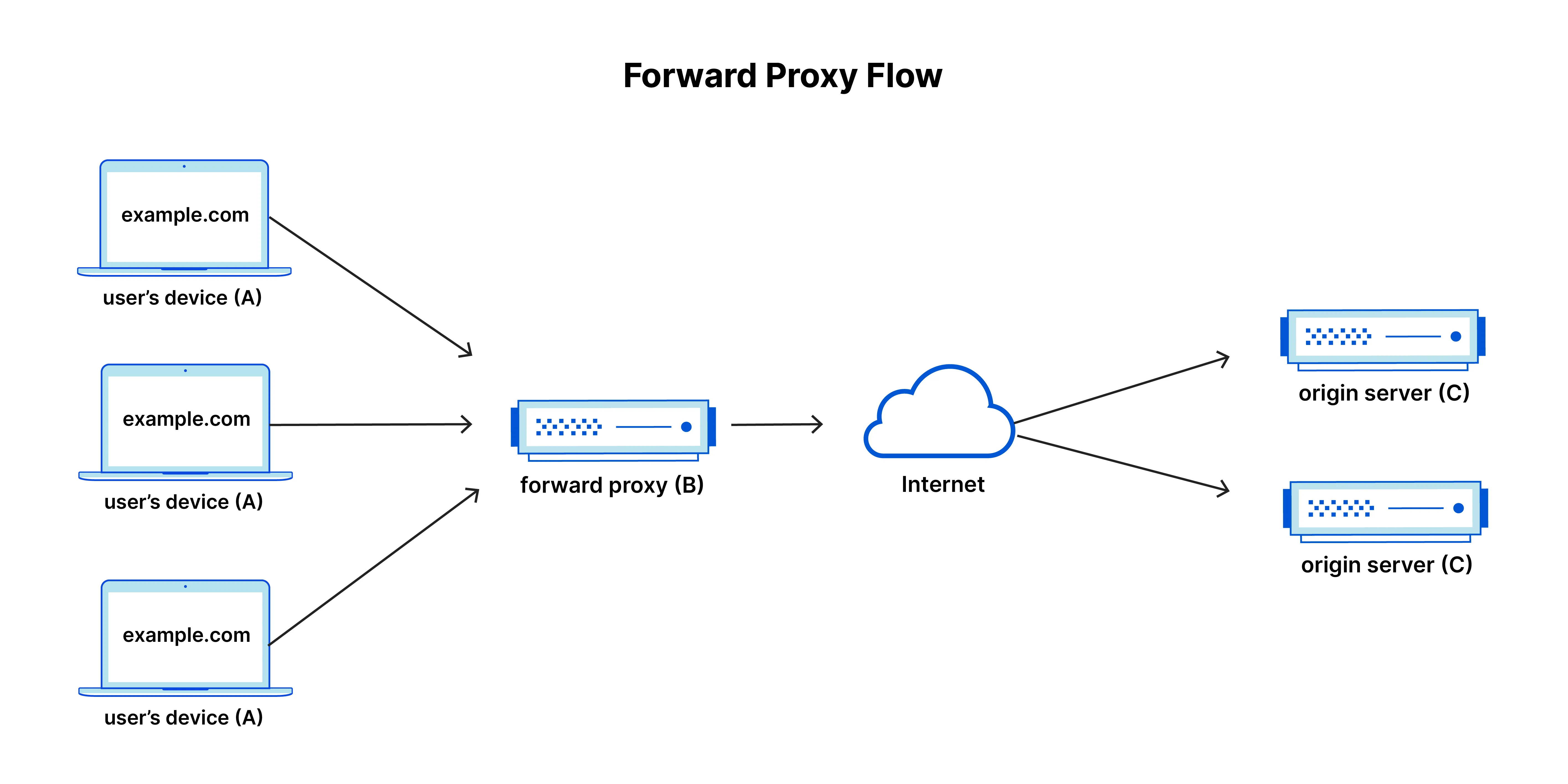
正向代理,通常也称为代理、代理服务器或网络代理,是位于一组客户端机器前面的服务器。当这些计算机向互联网上的网站和服务发出请求时,代理服务器会拦截这些请求,然后代替这些客户端与 Web 服务器通信,就像一个中间人。左图展示了一个示例。使用正向代理可能有以下几个原因:
- 绕过地区的浏览限制
- 屏蔽某些内容的访问(比如拦截广告)
- 保护自己的线上身份
- 以及某些神秘国度的特殊原因
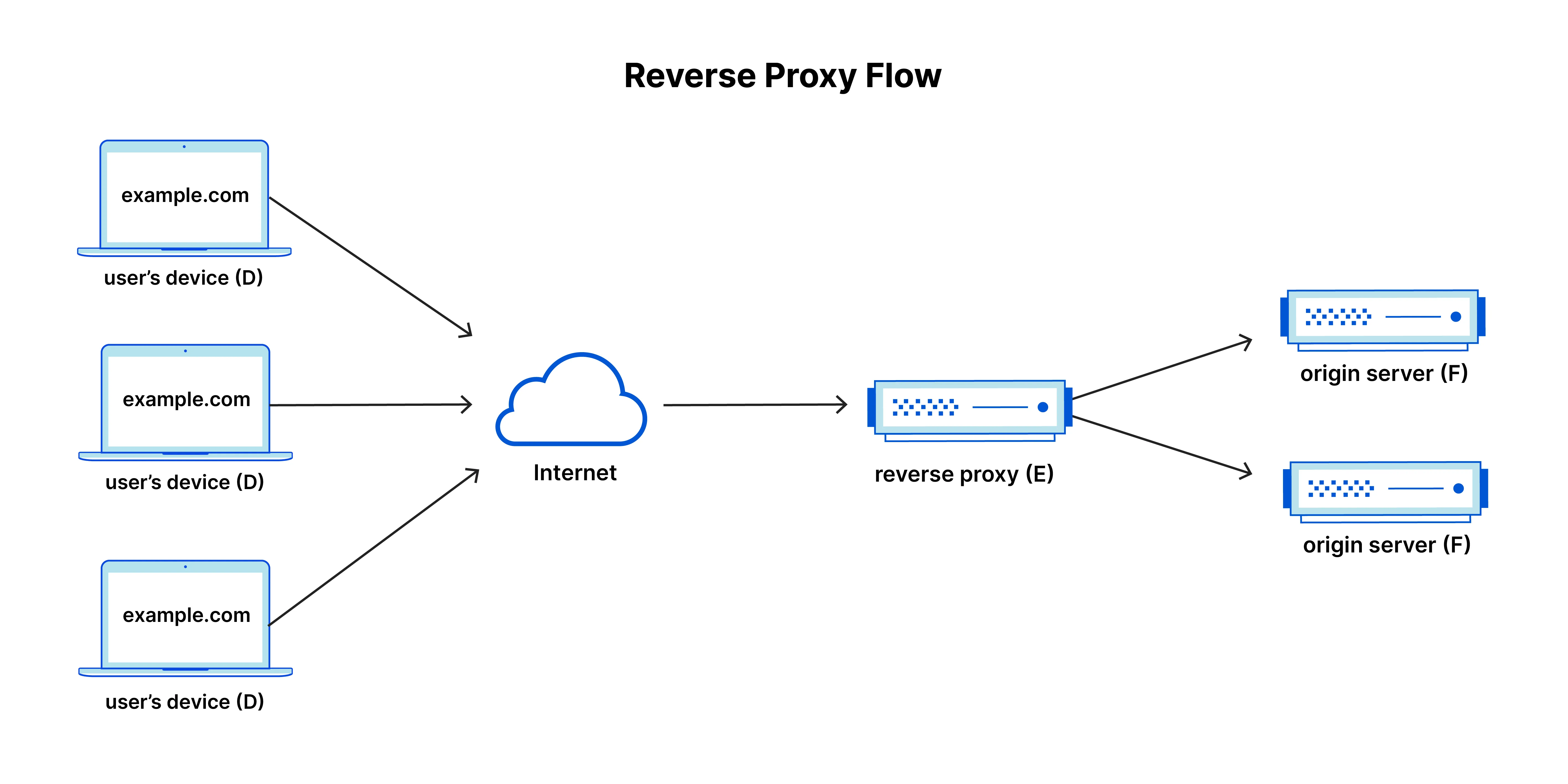
反向代理是位于 Web 服务器前面的服务器,它会将客户端(例如网页浏览器)的请求转发给这些 Web 服务器,确保任何客户端都不会直接与源服务器通信。右图展示了一个示例。使用反向代理可能有以下几个原因:
- 负载均衡
- 防御攻击(比如隐藏端口,在这种情况下)
- 全局服务器负载均衡(GSLB)
- 缓存
- SSL 加密
2.2 nginx 的配置
这里有一个对我有效的示例配置文件。
# /etc/nginx/conf.d/example.conf

server {
    listen 443 ssl http2;
    listen [::]:443 ssl http2;
    server_name domain.com; # set to your domain name

    ssl_certificate /path/to/your/cert; # set to the path of ssl certificate
    ssl_certificate_key /path/to/your/key; # set to the path of ssl certificate key

    ssl_protocols TLSv1.2 TLSv1.3;

    # Important: Disable error and access log, so that no IPs get logged
    access_log off;
    error_log off;

    location / {
        proxy_ssl_server_name on;
        proxy_ssl_name $host;
        proxy_ssl_verify off;
        proxy_pass https://127.0.0.1:5212; # replace 5212 with the actual port of your service
        proxy_set_header X-Real-IP $remote_addr;
        proxy_set_header X-Forwarded-For $proxy_add_x_forwarded_for;
        proxy_set_header Host $http_host;
        proxy_set_header cookie $http_cookie;
        proxy_set_header Proxy-Connection "";
	    client_max_body_size 100M; # default value is 1M
    }
}
Reference
[1] https://github.com/fatedier/frp
[2] https://github.com/nginx/nginx
[3] https://www.cloudflare.com/learning/cdn/glossary/reverse-proxy